Silicon Labs pinctrl in the Devicetree Manager
On Silicon Labs Series 2 (EFR32 and EFM32 xG21 to xG29, and their modules), a peripheral points to a pin node of its own, and the node's groups list the pins in a pins property. Each pin is a name from the pin header of your chip family: EUSART1_TX_PC3 is EUSART1 TX on PC3.
eusart1_default: eusart1_default {
    group0 {
        pins = <EUSART1_TX_PC3>, <EUSART1_SCLK_PC1>;
        drive-push-pull;
        output-high;
    };
    group1 {
        pins = <EUSART1_RX_PC2>;
        input-enable;
        silabs,input-filter;
    };
};
The screenshot uses the xG24 Dev Kit (xg24_dk2601b).
What Generate writes
When the peripheral has no pin node, the manager creates <peripheral>_default and splits the signals the way Silicon Labs boards do:
- EUSART and USART: TX, clock, CS, RTS and CTS in
group0(drive-push-pull,output-high), RX ingroup1(input-enable,silabs,input-filter). - I2C: SCL and SDA in one group (
drive-open-drain,bias-pull-up). - TIMER and LETIMER outputs: in
group0(drive-push-pull,output-low), on the timer'spwmnode.
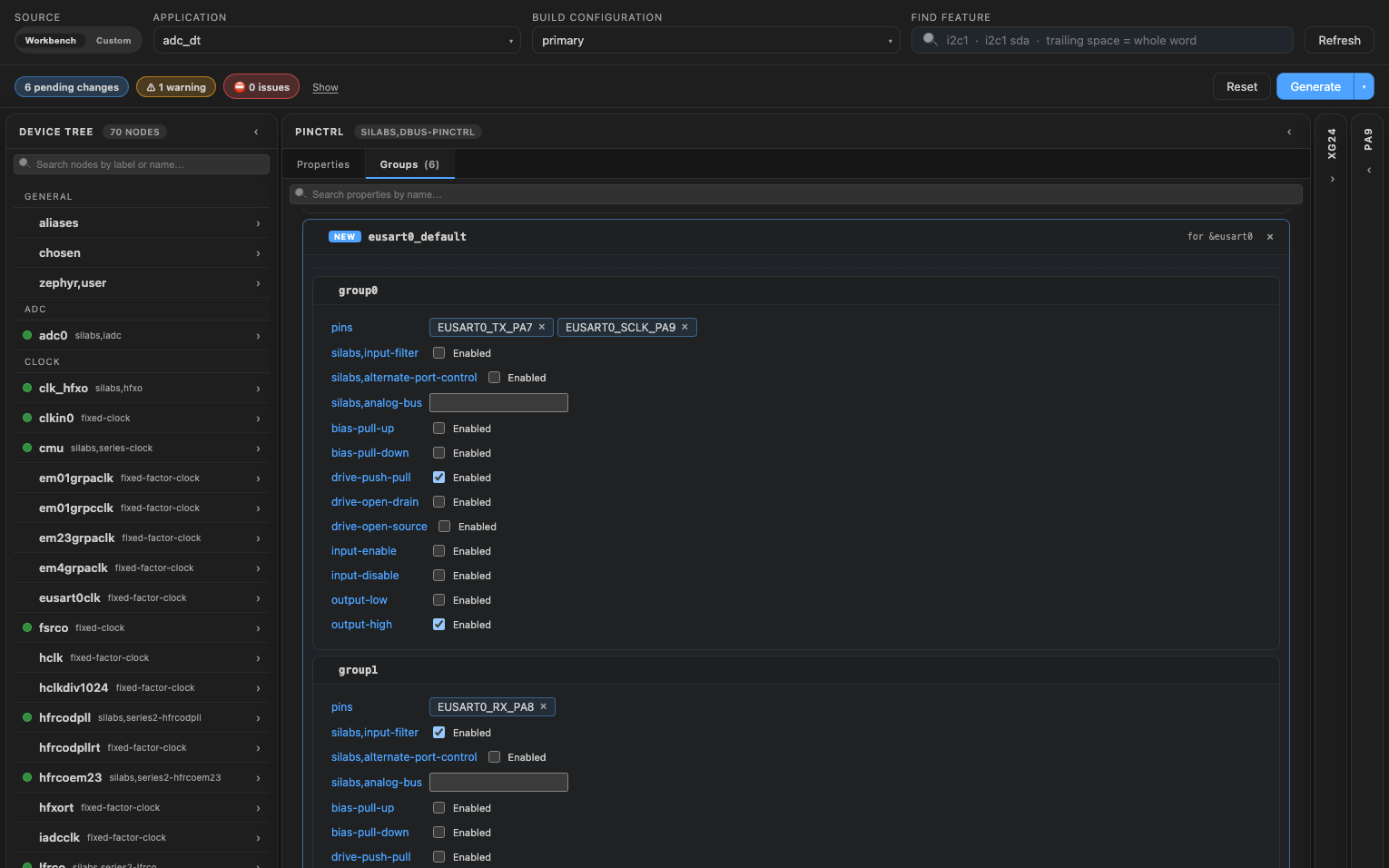
For EUSART0 as SPI on PA7, PA8 and PA9:
&pinctrl {
    eusart0_default: eusart0_default {
        group0 {
            pins = <EUSART0_TX_PA7>, <EUSART0_SCLK_PA9>;
            drive-push-pull;
            output-high;
        };
        group1 {
            pins = <EUSART0_RX_PA8>;
            input-enable;
            silabs,input-filter;
        };
    };
};
Change pin settings
Open the pinctrl node, then its Groups tab. Each group of the new node shows its settings:
note
Only Series 2 parts are supported. Series 1 (Gecko), SiWx91x and Si32 parts write their pins another way.