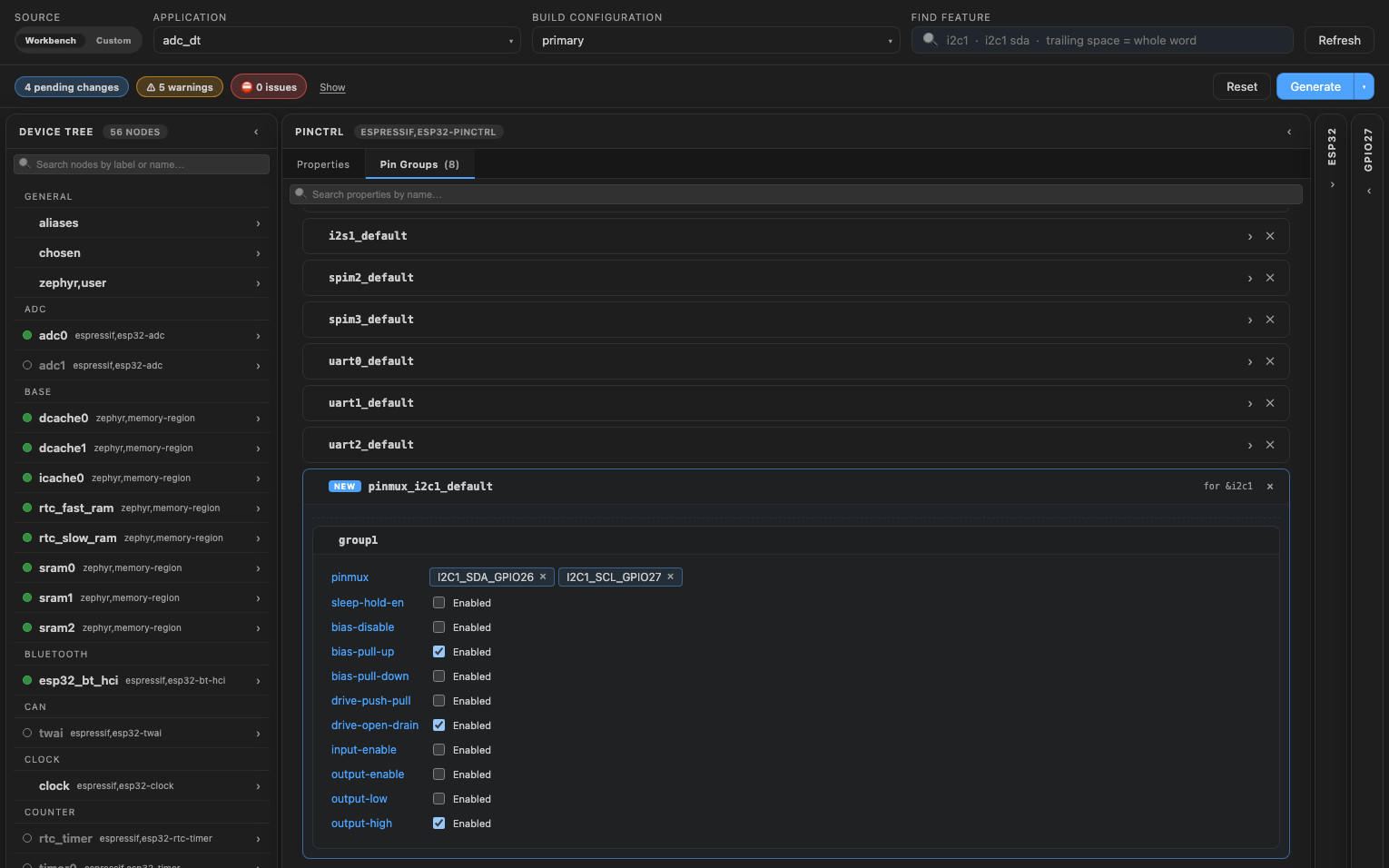
ESP32 pinctrl in the Devicetree Manager
ESP32 chips route most signals through a GPIO matrix: a UART, I2C or SPI signal can go to almost any GPIO. In Zephyr, a peripheral points to a pinmux node of its own, and the node's groups list the pins, with names like UART0_TX_GPIO1 (UART0 TX on GPIO1):
uart0_default: uart0_default {
    group1 {
        pinmux = <UART0_TX_GPIO1>;
        output-high;
    };
    group2 {
        pinmux = <UART0_RX_GPIO3>;
        bias-pull-up;
    };
};
The screenshot uses the ESP32 DevKitC board.
Route a pin
Because of the GPIO matrix, each GPIO lists many functions in the Functions card. Type the peripheral in the "Find feature" box (for example i2c1) to see only its signals, then click a pad and the signal (see Pin configuration).
What Generate writes
When the peripheral has no pinmux node, the manager creates pinmux_<peripheral>_default and puts each signal in the group ESP32 boards use:
- UART: TX in
group1withoutput-high, RX ingroup2withbias-pull-up. - SPI: MISO, SCLK and CSEL in
group1, MOSI ingroup2withoutput-low. - I2C: SDA and SCL in
group1withbias-pull-up,drive-open-drainandoutput-high.
&i2c1 {
    status = "okay";
    pinctrl-0 = <&pinmux_i2c1_default>;
    pinctrl-names = "default";
};

&pinctrl {
    pinmux_i2c1_default: pinmux_i2c1_default {
        group1 {
            pinmux = <I2C1_SDA_GPIO26>, <I2C1_SCL_GPIO27>;
            bias-pull-up;
            drive-open-drain;
            output-high;
        };
    };
};
On ESP32, the SPI clock pin is named SCLK. The header flags MOSI or MISO without SCLK.
Change pin settings
Open the pinctrl node, then its Pin Groups tab. The new group shows its settings: bias, push-pull or open drain, input and output enables, the output level and sleep-hold-en.