UART in the Devicetree Manager
A Zephyr UART is a node with two pins, TX and RX, and its line settings: baud rate, data bits, parity and stop bits. The Devicetree Manager sets them up, checks the pins each option needs and writes the result to your devicetree overlay.
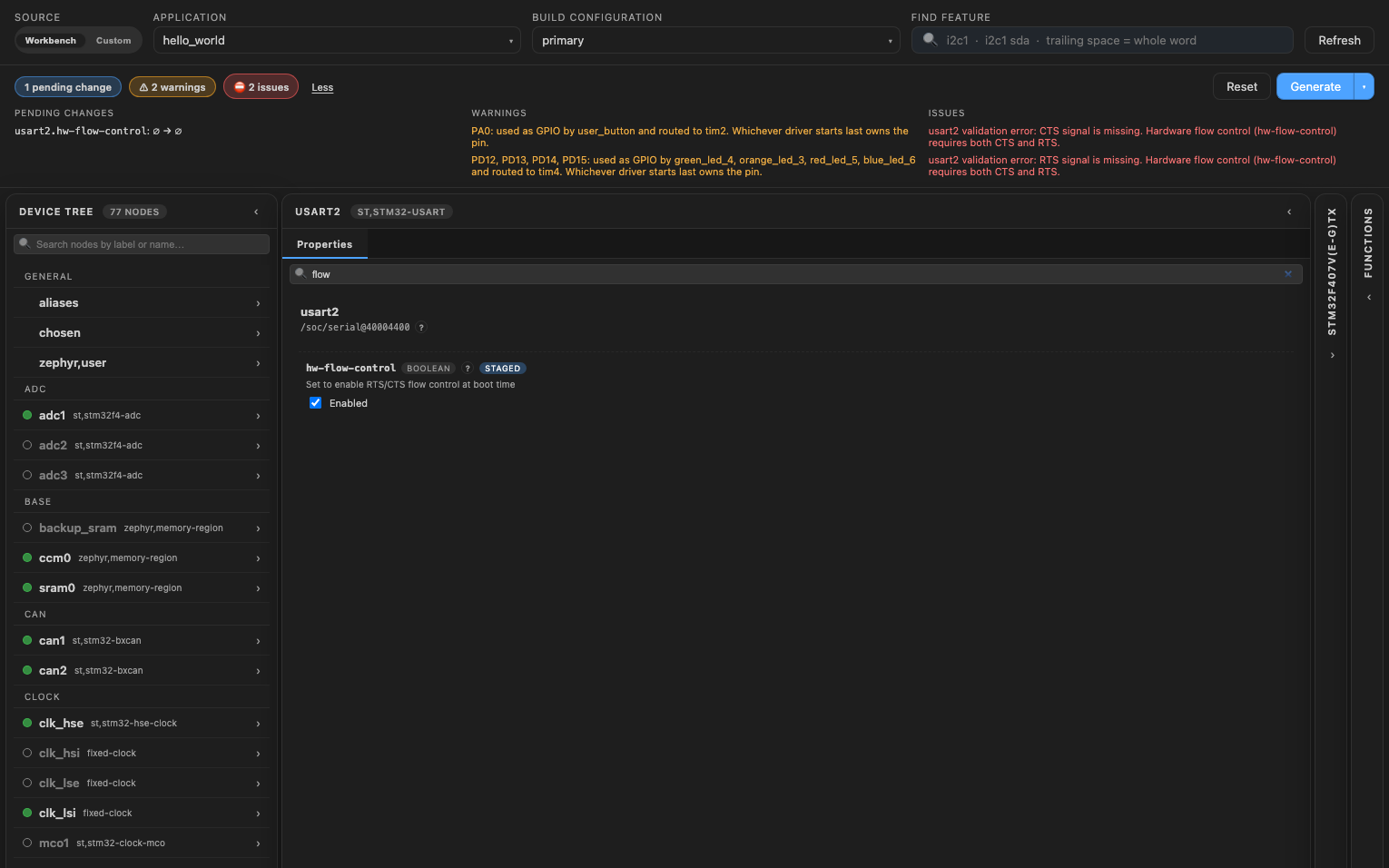
The screenshot uses the STM32F4 Discovery board (stm32f4_disco). The steps are the same on the other supported vendors.
Set up the UART
- Select the UART in the Device Tree list, for example
usart2. - If its
statusisdisabled, set it tookay. - Give it TX and RX. Type it in the "Find feature" box, click a pad that lights up, then click the signal in the Functions card. The header shows an issue while one is missing.
- Set the line settings:
current-speed(the baud rate, 115200 when not set),data-bits,parityandstop-bits.
Flow control and single-wire mode
Two options change the pins the UART needs:
hw-flow-control: give the UART CTS and RTS too. The header shows an issue for each one that is missing.single-wire(half duplex, on STM32 and NXP LPUART): give it TX only. RX must stay free, and the header flags it if it has a pin.
tip
To find a property in a long list, type its name in the search box of the node editor, for example flow.
Write the overlay
Click "Generate" to write your changes to the overlay, then rebuild the application. See Generate the overlay.