Microchip SAM and PIC32C pinctrl in the Devicetree Manager
The chip view supports SAM D, SAM C, SAM L, SAM R, SAM D5x / E5x, SAM3X, SAM4E, SAM4L, SAM4S, SAM E70, SAM V71, PIC32CM, PIC32CX and PIC32CZ. A peripheral points to a pinmux node of its own, <peripheral>_default, and the node's group lists the pins. Each pin is a name from Microchip's pin header for your chip: PA8D_SERCOM2_PAD0 is SERCOM2 pad 0 on PA8, peripheral function D.
sercom2_i2c_default: sercom2_i2c_default {
    group1 {
        pinmux = <PA8D_SERCOM2_PAD0>, <PA9D_SERCOM2_PAD1>;
    };
};
The screenshot uses the SAM D21 Xplained Pro board.
SERCOM: pick the mode first
A SERCOM runs as a UART, an I2C or a SPI, depending on its compatible: for example atmel,sam0-uart, atmel,sam0-i2c or atmel,sam0-spi (microchip,sercom-g1-uart, microchip,sercom-g1-i2c or microchip,sercom-g1-spi on PIC32C and SAM E54 boards). Its pins are named PAD0 to PAD3 in every mode.
- A SERCOM the board leaves without a mode takes no pins, and the build would fail: the header flags its pins. Set its
compatiblein your overlay (outside the generated block) and rebuild before you route its pins. - In I2C mode, SDA is PAD0 and SCL is PAD1. The header flags a missing one.
- In UART and SPI mode, any pad can carry a role. Say which in the SERCOM's properties:
rxpoandtxpofor a UART,dipoanddopofor a SPI.
Timer outputs (TCC and TC)
A TCC that the board leaves as a timer drives no pins. When you give it its first output pin (WO0 to WO7), the manager also makes it a PWM controller. Here, TCC1 output WO0 on PA6:
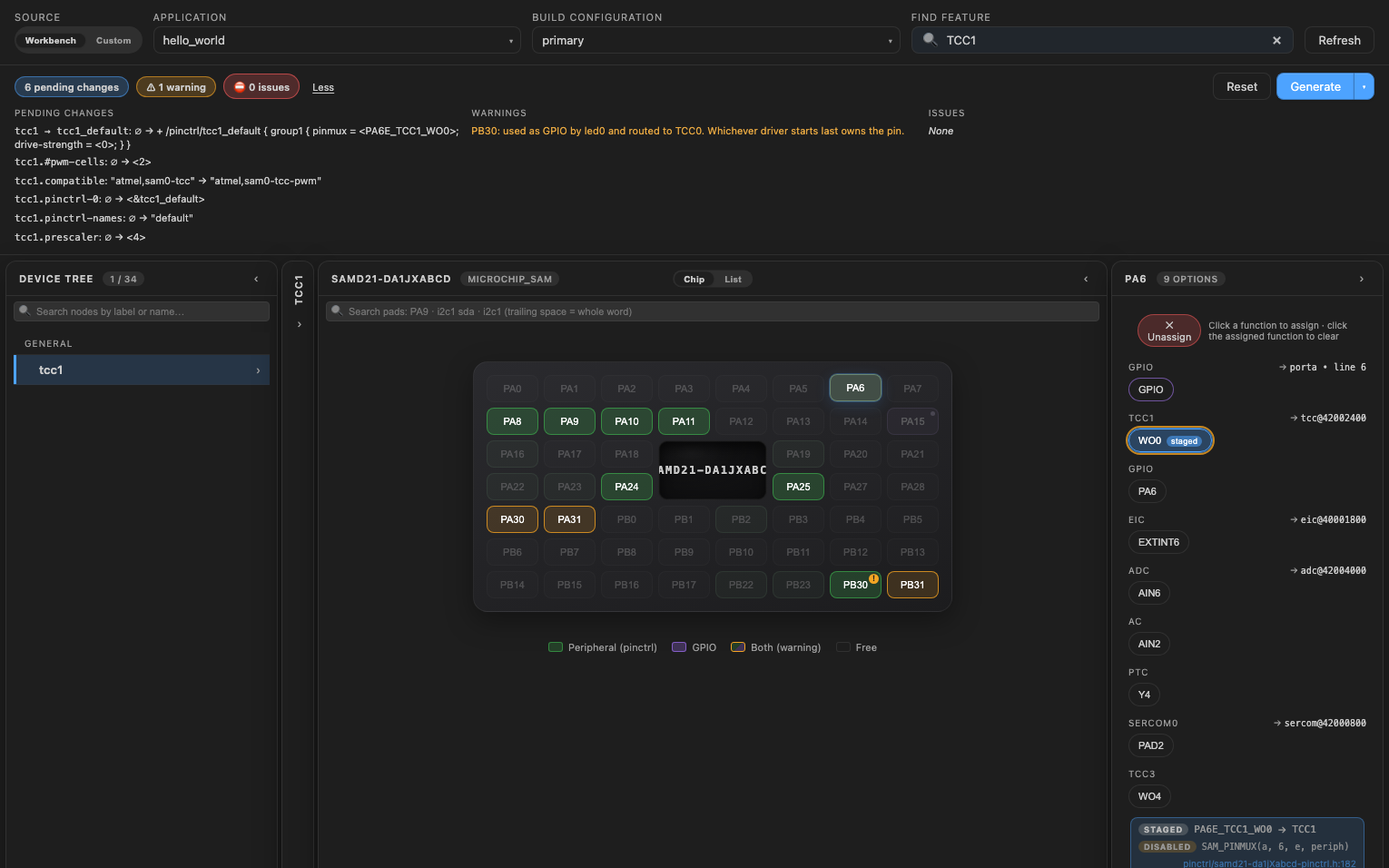
&tcc1 {
    pinctrl-0 = <&tcc1_default>;
    pinctrl-names = "default";
    compatible = "atmel,sam0-tcc-pwm";
    #pwm-cells = <2>;
    prescaler = <4>;
};
Unassigning that pin takes the change back. To use the timer, set its status to okay. To drive an output from your application, see PWM. A TCC has more outputs than channels: WO4 of a 4-channel TCC is channel 0, and the PWM table writes the right one.
A TC drives its PWM on WO1 only. On PIC32C boards and the sam_e54_xpro and sam_e54_cult boards, the TC's WO1 pin makes it a PWM controller the same way. On the other SAM boards, set a TC up as a PWM controller in your overlay yourself: Zephyr's TC PWM driver does not support SAM D20, D21 and R21.
What Generate writes
When the peripheral has no pinmux node yet, the manager creates <peripheral>_default, with the pins in group1. Microchip's boards write no pin settings: a new group gets the binding's defaults only.
On SAM3X, SAM4 and SAM E70 / V71, a UART's RX and RTS go in group1 with a pull-up, the other pins in group2. For USART0 on the SAM4S Xplained:
&usart0 {
    pinctrl-0 = <&usart0_default>;
    pinctrl-names = "default";
};

&pinctrl {
    usart0_default: usart0_default {
        group1 {
            pinmux = <PA5A_USART0_RXD>;
            bias-pull-up;
        };
        group2 {
            pinmux = <PA6A_USART0_TXD>;
        };
    };
};
When the board already defines a group of that name without using it (usart2_default on the SAM E70 Xplained), the new one is usart2_default_1, and the board's stays as it is.
Change pin settings
Open the pinctrl node, then its Groups tab. A group the manager creates shows its settings as checkboxes and lists; the board's own groups open like any node.