Multibuild
Multibuild lets one application keep several build configurations: different target boards, different Kconfig fragments, different devicetree overlays.
Add a build configuration
- Right-click on the application > Build Configuration > Add Multibuild.
- Enter a name for the new build configuration.
- Select the target board (or "Enter custom board..." to type an identifier).
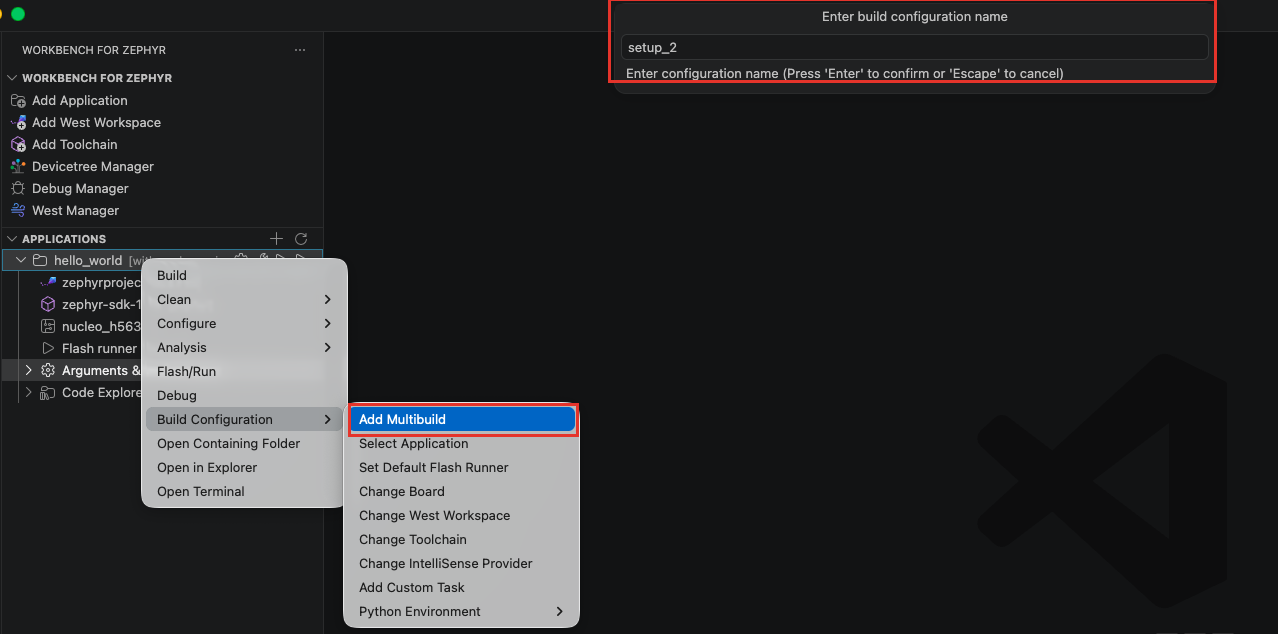
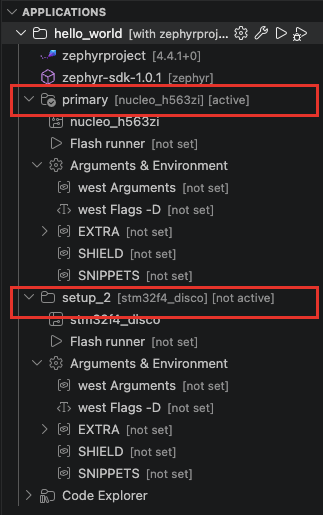
The "Applications" view now shows one node per build configuration. Each configuration keeps its own board, flash runner, and "Arguments & Environment" settings, and builds into its own build/<configuration name> directory.
Active configuration
The default configuration is named primary. At most one configuration is active at a time, marked [active] in the view. Commands run on the application itself (Build, Flash/Run, Debug, the Configure tools, the status bar buttons) target the active configuration.
To switch, right-click on a configuration > Set Active. Set Inactive is available on the active configuration.
Per-configuration menu
Right-click on a build configuration to act on that configuration only:
- Build
- Clean: Rebuild/Pristine, Delete Build.
- Configure: Kconfig Manager, Gui Config, Menuconfig, Harden config, Sysbuild (see Kconfig Manager and the other configuration pages). Kconfig Manager and Sysbuild act on this configuration; for Gui Config, Menuconfig and Harden config, use Set Active on the configuration first (they run on the active configuration).
- Analysis: the same analysis tools as on the application.
- Flash/Run and Debug
- Build Configuration: Set Default Flash Runner (see Flash and Run), Change Board, Change West Workspace, Change Toolchain, Change IntelliSense Provider.
- Rename and Delete
- Set Active / Set Inactive
- Open Terminal: a terminal with this configuration's environment.
Rename, Build, Gui Config, Flash, Debug and Delete are also available as inline icons when hovering the configuration row.
One build configuration is always required. To delete the last one, first create a new configuration, then delete the old one.