ADC channels in the Devicetree Manager
A Zephyr ADC reads its inputs through channels: one child node per channel, with its own gain, reference, acquisition time and resolution. Your application reads the channels listed in the io-channels property of the zephyr,user node. The Devicetree Manager builds the channel from the pin you pick and writes it to your devicetree overlay.
The screenshot uses the STM32F4 Discovery board (stm32f4_disco). The steps are the same on the other supported vendors.
The Channels tab
Open the ADC node (for example adc1), then its Channels tab. It lists:
- The channels, with their input pin and who reads them ("app" is your application).
- The pins routed to the ADC that no channel reads yet ("routed, no channel").
Add a channel
- Click + Add channel on a "routed, no channel" row. Or click + Add channel under the list and pick the input: free pins come first, then pins in use, then inputs that are not pins.
- Check the settings: Resolution, Gain, Reference and Acquisition time. The lists only offer what the ADC accepts. More settings holds the others.
- Click Use in app so your application can read the channel. The button becomes an "app" chip; click "app ✕" to take it back.
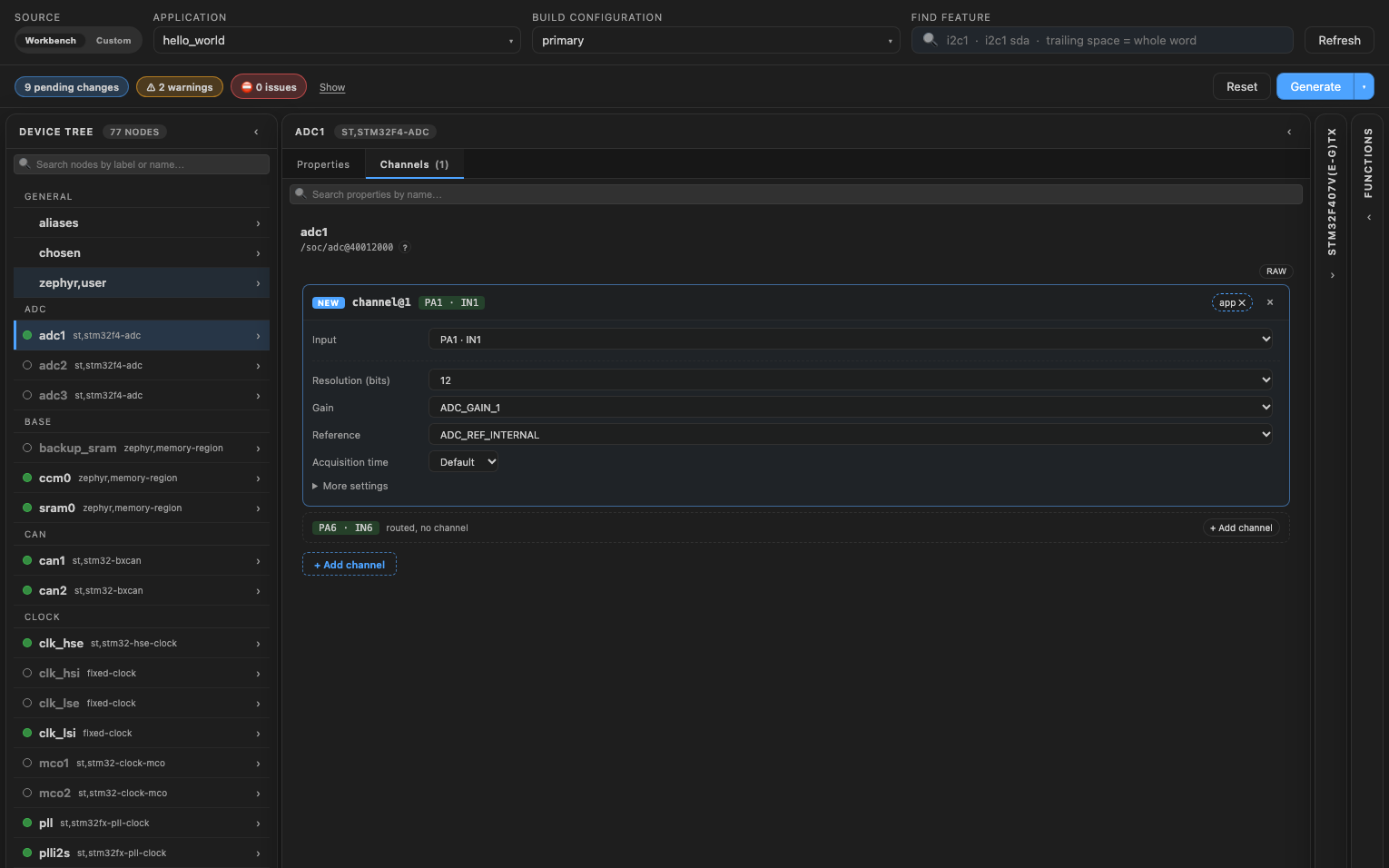
Picking a pin also routes it to the ADC and turns the ADC on. A new channel starts with the settings of the ADC's other channels, when it has some. Routing an ADC pin from the chip adds its channel too.
Generate writes the channel and the application's reference to the overlay, with the header its values come from:
#include <zephyr/dt-bindings/adc/adc.h>

/ {
    zephyr,user {
        io-channels = <&adc1 1>;
    };
};

&adc1 {
    #address-cells = <1>;
    #size-cells = <0>;
    channel@1 {
        reg = <1>;
        zephyr,gain = "ADC_GAIN_1";
        zephyr,reference = "ADC_REF_INTERNAL";
        zephyr,acquisition-time = <ADC_ACQ_TIME_DEFAULT>;
        zephyr,resolution = <12>;
    };
};
Read the channel in your application
Your code reads the channel by its position in io-channels. The tooltip of Use in app gives the line to use:
static const struct adc_dt_spec adc_channel =
    ADC_DT_SPEC_GET_BY_IDX(DT_PATH(zephyr_user), 0);
What the manager checks
The header flags:
- Two channels with the same number.
- A channel whose pin is not routed to the ADC.
- A channel without a resolution.
- A reference other than the internal one, without its voltage (
zephyr,vref-mv). - A differential channel on an ADC that cannot do it.
io-channel-namesinzephyr,userthat do not matchio-channelsone for one.
See the raw values
Click "raw" at the top right of the Channels tab to see the channels as plain nodes and properties. "resolve" brings the channel view back.
Write the overlay
Click "Generate" to write your changes to the overlay, then rebuild the application. See Generate the overlay.