Using Custom Boards
Workbench for Zephyr supports custom board definitions.
There are three ways to make a custom board visible to the extension:
- Option 1: set the
BOARD_ROOTvariable on the west workspace. - Option 2: package the board as a Zephyr module, referenced via
EXTRA_ZEPHYR_MODULESor the west manifest. - Option 3: set
BOARD_ROOTin the application, in itsCMakeLists.txtor as a-Dflag.
Boards are discovered with west boards. The Add Application wizard lists the boards of the west workspace (options 1 and 2.3). Change Board and Add Multibuild also list the boards the application adds (options 2.1, 2.2 and 3). See How boards are found for the details.
No registration is needed just to build for a board the extension cannot discover: every board picker ends with "Enter custom board...", which lets you type the board identifier manually.
Creating a Custom Board
Before using any of the options below, you need to create the board definition files. A custom board is a folder with a fixed structure that describes the hardware to Zephyr (SoC, memory, peripherals, default config).
For more information, refer to the Zephyr Board Porting Guide.
The minimal required structure is:
<board_root>/
└── boards/
    └── <vendor>/
        └── <board_name>/
            ├── board.yml
            ├── <board_name>.yaml
            ├── <board_name>.dts
            ├── Kconfig.<board_name>
            └── <board_name>_defconfig
Option 1: BOARD_ROOT (West Workspace variable)
Set BOARD_ROOT on the west workspace so the extension searches an additional directory for board definitions.
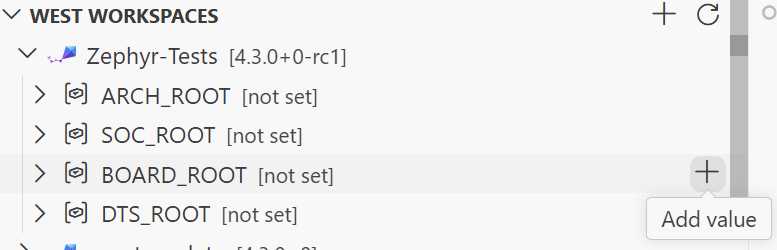
- In the "West workspaces" view, expand the workspace, then its "Configurations" group, and click the inline [+] (Add value) on the
BOARD_ROOTrow.
- Enter the absolute path to the folder that contains the
boards/subdirectory and pressEnter.

Example: for the layout /home/user/my_boards/boards/ac6/myboard/, set BOARD_ROOT to /home/user/my_boards.
The "Configurations" group holds the other workspace search roots too (DTS_ROOT, SOC_ROOT, ARCH_ROOT, SNIPPET_ROOT). They are set the same way: [+] to add a value, the pencil and remove icons on a value to edit or delete it.
Option 2: Zephyr Module
Package the board definitions as a Zephyr module: a folder with a zephyr/module.yml file that declares the board root:
my_module/
├── boards/
│   └── <vendor>/
│       └── <board_name>/
└── zephyr/
    └── module.yml
zephyr/module.yml:
name: my-module
build:
  settings:
    board_root: .
Then register the module using one of the options below.
Option 2.1: EXTRA_ZEPHYR_MODULES (per application)
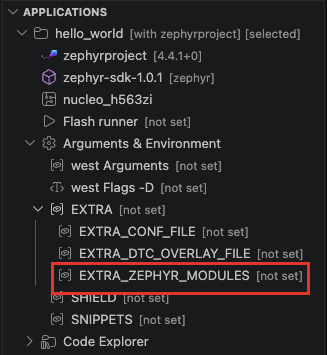
- In the "Applications" view, expand the application (or the build configuration), then "Arguments & Environment" > "EXTRA", and click the inline [+] on the
EXTRA_ZEPHYR_MODULESrow.
- Enter the absolute path to the module directory and press
Enter.

The "EXTRA" group also holds EXTRA_CONF_FILE and EXTRA_DTC_OVERLAY_FILE, next to the other per-configuration rows (SHIELD, SNIPPETS). See Applications for the full "Arguments & Environment" reference.
Option 2.2: EXTRA_ZEPHYR_MODULES (CMake)
You can also specify EXTRA_ZEPHYR_MODULES directly in your application's CMakeLists.txt file. This is useful if you want to ensure the module is always included when building the application, regardless of the workspace configuration.
Add the following line to your CMakeLists.txt:
set(EXTRA_ZEPHYR_MODULES "<absolute_path_to_module>")
Replace <absolute_path_to_module> with the absolute path to your module directory.
Example:
set(EXTRA_ZEPHYR_MODULES "/home/user/my_module")
set(EXTRA_ZEPHYR_MODULES "$ENV{ZEPHYR_BASE}/../relative/to/zephyr/my_module")
This approach ensures the module is included during the CMake configuration phase.
Option 2.3: West manifest (west.yml)
Add the module as a project in the workspace west.yml so it is fetched automatically with west update:
manifest:
  projects:
    - name: my-module
      url: https://github.com/my-org/my-module
      revision: main
      path: modules/my-module
Option 3: BOARD_ROOT in the application
Keep the board next to the application, in <application>/boards/<vendor>/<board_name>/, and add the application folder to BOARD_ROOT in its CMakeLists.txt, before find_package(Zephyr):
cmake_minimum_required(VERSION 3.20.0)
list(APPEND BOARD_ROOT ${CMAKE_CURRENT_SOURCE_DIR})
find_package(Zephyr REQUIRED HINTS $ENV{ZEPHYR_BASE})
project(my_app)
A board folder can also be given per build configuration as a CMake definition: in "Arguments & Environment", add BOARD_ROOT=<path> to "west Flags -D". A relative path is relative to the application folder.
How boards are found
A board picker runs west boards once, over these folders:
- Zephyr's own boards and the board roots of the modules in the west manifest, which
west boardsfinds by itself. - The west workspace folder and its
BOARD_ROOTsetting.
Change Board and Add Multibuild also search the folders the application build configuration adds, read from its files and settings:
BOARD_ROOTset withset()orlist(APPEND ...)in the applicationCMakeLists.txt.BOARD_ROOTin "west Flags -D", or as-DBOARD_ROOT=...in "west Arguments".- The
board_rootof each module inEXTRA_ZEPHYR_MODULES, whether it comes from the "EXTRA" setting, a-Dflag or theCMakeLists.txt. - The
BOARD_ROOTvalues a previous build recorded inzephyr_settings.txt.
Nothing is built or configured to find these folders. A folder is searched only if it contains a boards/ folder, and a folder named by several settings is searched once.
In CMakeLists.txt, only absolute paths are followed, written directly or built with ${CMAKE_CURRENT_SOURCE_DIR}, ${CMAKE_CURRENT_LIST_DIR}, ${CMAKE_SOURCE_DIR} or $ENV{ZEPHYR_BASE}. A path that uses another variable is not followed: choose "Enter custom board..." for such a board.
Each board target, for example nrf5340dk/nrf5340/cpuapp, is listed once, with the first name found among:
- The
nameof the twister file (<board>.yaml) whoseidentifieris that target. - The
full_nameof the board inboard.yml(Zephyr 4.0 and later). - The board name.
A board.yml that defines several boards in a boards: list works the same way: each board is listed with its own full_name.
For clear names in the board pickers, give your board a full_name in board.yml (Zephyr 4.0 and later), and a twister file per target when each target needs its own name.
Since Zephyr 4.0, west boards fails when two folders define a board with the same name. The picker then lists the boards of the west workspace only, and the west boards message is written to the "Ac6 Zephyr Workbench" output. Rename one of the boards, or remove its folder from the settings, to list the application boards again.
Differences between Zephyr versions
The folders searched are the same on every Zephyr version. What west boards reports about them changes:
| Zephyr version | Entries listed | Name of a target without its own twister file | Board defined in two folders |
|---|---|---|---|
| 3.6 and older | One entry per board, for example nrf5340dk_nrf5340_cpuapp | The board name | Listed once |
| 3.7 | One entry per target, for example nrf5340dk/nrf5340/cpuapp | The board name, as board.yml has no full_name yet | Both definitions are listed |
| 4.0 and 4.1 | One entry per target | The full_name from board.yml | Only the boards of the west workspace are listed |
| 4.2 and later | One entry per target, plus one per board revision, for example nrf9160dk@0.14.0/nrf9160 | The full_name from board.yml | Only the boards of the west workspace are listed |
Before Zephyr 4.2, west boards does not report board revisions. To build for a given revision on those versions, choose "Enter custom board..." and type it, for example nrf9160dk@0.14.0/nrf9160.