Kconfig Manager
The Kconfig Manager is a menuconfig/guiconfig style editor that runs directly inside VS Code. It edits the Kconfig options of one application and one build configuration, with a searchable option tree, an info pane, and undo/redo.
Its key advantage over the classic interactive tools: it keeps track of the values that only live in the build's .config and can turn them into prj.conf or config fragment content in one click. With menuconfig or guiconfig, those changes stay in the build directory and are silently lost on the next pristine build unless you copy them by hand. See Make changes permanent.
Prefer the classic tools? Menuconfig (terminal) and GUI Config (external window) are still available in the same "Configure" submenu.
Open the Kconfig Manager
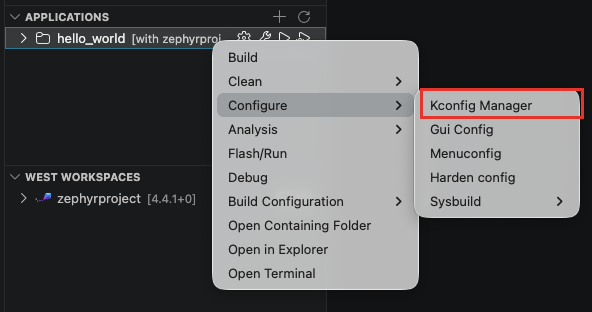
In the "Applications" view, right-click on the application > Configure > Kconfig Manager. You can also right-click on a specific build configuration to open it for that configuration.
- The panel opens as an editor tab named "Kconfig:
<app>[<config>]". Each build configuration gets its own tab. - If the application has several build configurations and none is active, a picker "Kconfig Manager: choose a build configuration" lets you pick one.
If the build directory is not configured yet, the panel first runs the CMake configure stage automatically (the same preparation west build -t menuconfig does). If that step fails, check the task output and click "Retry". Panel messages are also logged in the "Zephyr Workbench: Kconfig" output channel.
Layout
- Toolbar: a "Filter tree…" box (space separates terms that must all match, regex allowed), a jump button (also
/orCtrl+F) to search a symbol by name or prompt, and two toggles:- "name": show the
CONFIG_symbol names next to the prompts. - "all": also show invisible options, dimmed.
- "name": show the
- Action row: undo/redo, the pending-changes pill, the save and export buttons (see below), and a "● Modified" marker when there are unsaved changes.
- Path bar: a breadcrumb of the current menu location. Click a parent to go back up.
- Option tree (left): the same menu hierarchy as
menuconfig. Options that have never been assigned show a "NEW" badge. - Info pane (right): details for the selected symbol: its name, type and current value, then "Prompt", "Blocked by (unmet dependencies)" when it is locked, "Help", "Direct dependencies", "Defaults", "Choice symbols", and "Definition" with a clickable
file:linethat opens the Kconfig source in an editor.
Edit values
- bool / tristate: click the checkbox to cycle the value (checked =
y, "M" = module, empty =n), or pressy,m,non the selected row. - choice: click the radio ring of the option you want to select.
- string / int / hex: type in the inline editor. The expected range is hinted and invalid values are rejected with an error.
- Options whose dependencies are not met show a lock icon ("Locked by dependencies") and cannot be changed. Select the option and read "Blocked by (unmet dependencies)" in the info pane to see which symbols to enable first.
- Use undo/redo (
Ctrl+Z/Ctrl+Y) to step through your edits.
Pending changes
Every edit is tracked before it is saved:
- The "
<n>changed" pill in the toolbar opens the changes panel: each row shows the symbol, its old and new value, and a "Revert" button. - The tab title and the toolbar show "● Modified" while changes are unsaved.
- If you close the tab with unsaved changes, a dialog asks whether to save them to the build's
.config("Save" / "Don't Save"). Cancel reopens the panel with your changes intact.
Save and load
- Save: writes the build configuration's
.configin the build directory. A notification offers "Build now" to rebuild so the change takes effect. - Save As…: saves a copy of the full configuration to a file of your choice.
- Save minimal…: saves a minimal
defconfigcontaining only the options that differ from their defaults. - Open…: loads a configuration file, replacing the current values.
If the .config file changes on disk (for example after a build), the panel reloads it automatically when you have no local edits. With unsaved edits, your changes are kept; use "Open…" to reload from disk.
Make changes permanent
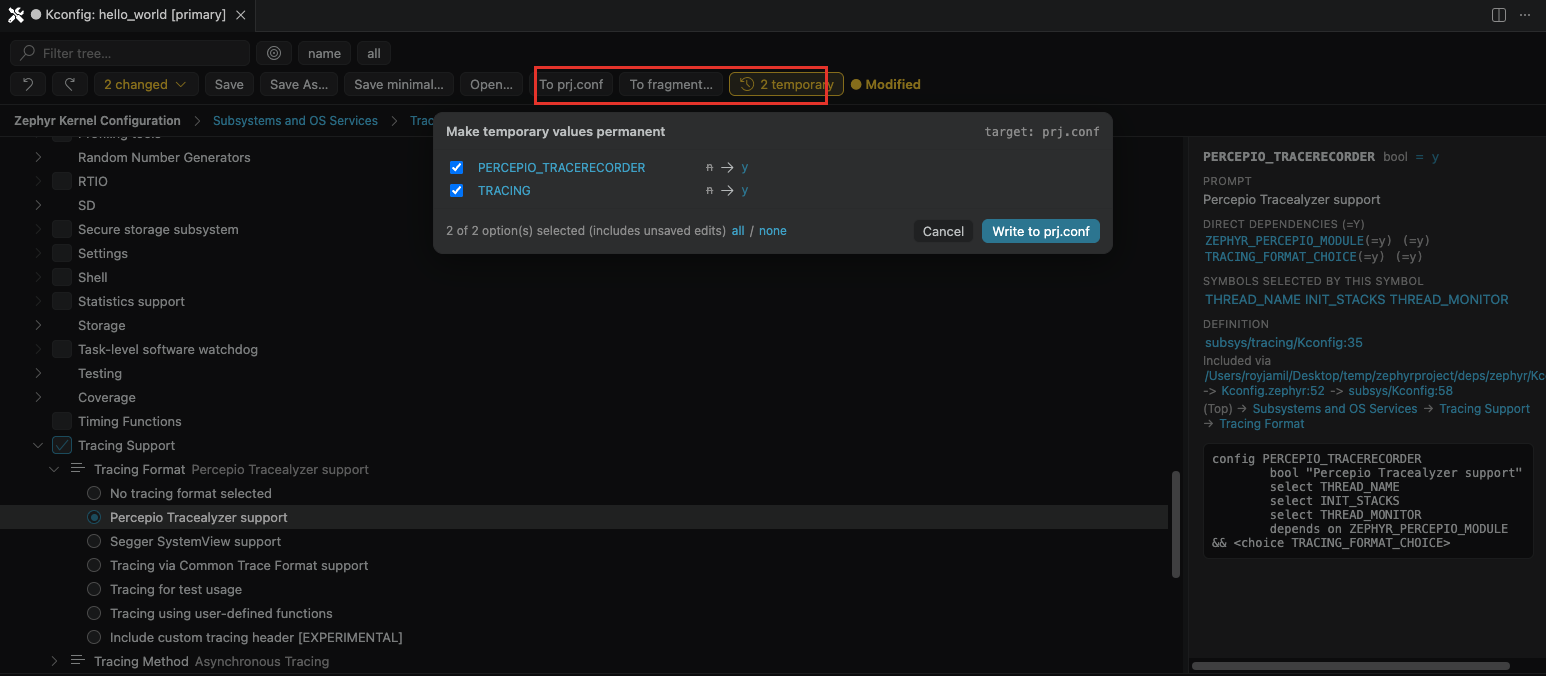
This is the feature that sets the Kconfig Manager apart. Saving to .config only affects the current build directory: a pristine build regenerates .config from the project's config files (prj.conf and fragments) and discards anything else. The "<n> temporary" pill counts the options that currently differ from those files, automatically, including values you set earlier with menuconfig, guiconfig or scripts.
To persist them:
- To prj.conf: writes the temporary values to the application's
prj.conf. - To fragment…: writes them to an extra config fragment file (
.conf) of your choice. If the fragment is not part of the build yet, the confirmation notification offers "Add to build config", which registers it in the build configuration'sEXTRA_CONF_FILE.
Both open the "Make temporary values permanent" overlay first:
- Review the list: each entry shows the old and new value, with a checkbox to include or exclude it. A warning icon flags values that a later fragment would override.
- Use the "all" / "none" links to adjust the selection.
- Click "Write to
<file>". The options are written to a managed region of the target file, so re-exporting later updates the same block.
Keyboard shortcuts
| Key | Action |
|---|---|
↑ / ↓ (or k / j) | Move the selection |
PageUp / PageDown, Home / End | Move faster / jump to start or end |
Space | Toggle the selected option (or enter a menu) |
Enter / → | Enter or expand |
← | Collapse or go to the parent |
y / m / n | Set the value directly |
/ or Ctrl+F | Jump to a symbol |
Shift+C | Toggle CONFIG_ symbol names |
Shift+A | Toggle invisible options |
s | Save |
Shift+S | Save As… |
d | Save minimal… |
o | Open… |
Ctrl+Z / Ctrl+Y | Undo / Redo |