Host Tools Manager
The Host Tools Manager shows the status of the host tools installed by Workbench for Zephyr. From this page you can reinstall or verify the tools, switch a tool between the bundled and the system version, manage global environment variables, and register custom tool paths.
To open it, go to the Host tools view in the Workbench for Zephyr sidebar and click Host Tools Manager.
When your installation is older than the version required by the extension, the sidebar entry reads Host Tools Manager ⚠️ Needs update. Open the manager and click Reinstall host tools to update.
Zinstaller
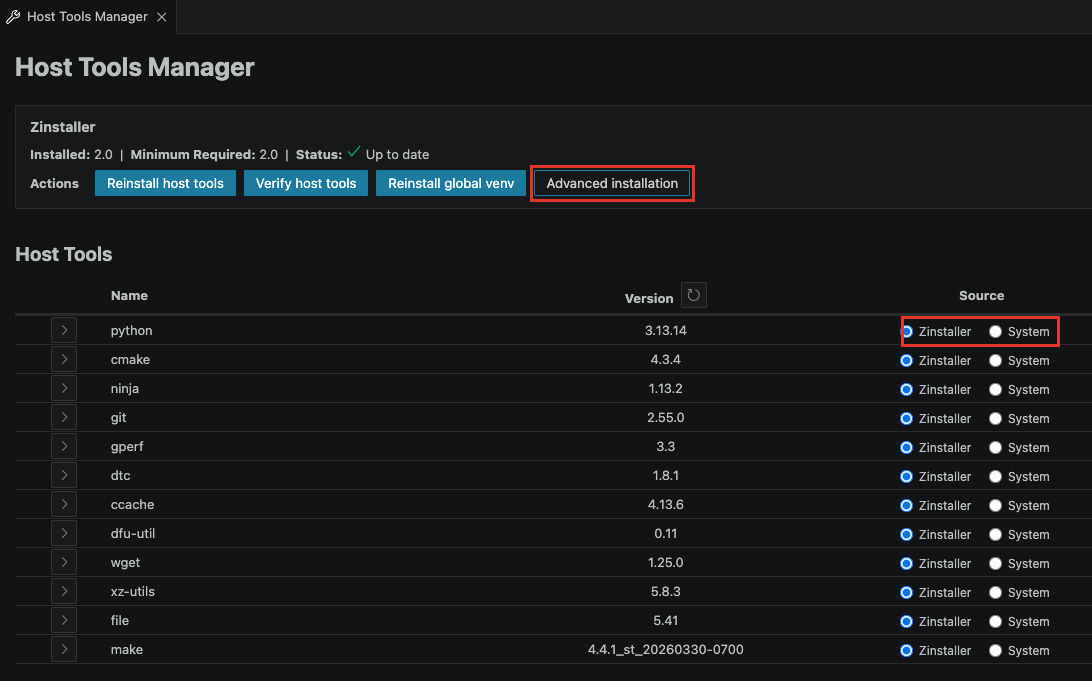
Zinstaller is the installer that sets up the host tools. The portable tools live in the .zinstaller folder of your home directory. The summary at the top of the page shows:
- Installed: the Zinstaller version currently installed.
- Minimum Required: the minimum version required by the extension.
- Status: Up to date, or Needs update, Reinstall Host Tools when a reinstall is needed.
Actions
- Reinstall host tools: reinstalls all the host tools. A confirmation dialog appears with two choices: Reinstall runs the full reinstall, Advanced opens the Advanced Host Tools Installation page instead.
- Verify host tools: checks that the installed tools are present and match the expected versions.
- Reinstall global venv: recreates the global Python virtual environment used by Workbench.
- Advanced installation: opens the Advanced Host Tools Installation page to install or repair individual tools.
Verification and the venv reinstall are also available from the Command Palette: Zephyr Workbench: Verify Host Tools and Zephyr Workbench: Reinstall VENV.
Host Tools
This section lists the host tools (for example CMake, Ninja, Git, Python) with their versions.
Versions are checked in the background when the page opens, so the Version column can take a moment to fill in. Click the refresh icon next to the Version header (Refresh versions) to check again.
Choose the tool source
Each tool has a Source setting with two options:
- Zinstaller: use the version installed by Workbench for Zephyr.
- System: use the version found on your system.
When you change the source, a confirmation appears. Click Switch to apply, or Cancel to keep the current source. Versions are re-checked after switching.
Edit a tool path
Click the chevron in front of a tool to expand its details row:
- Click Edit to unlock the Path: field.
- Enter the path, or use the folder icon to browse. Separate multiple paths with
;. - Click Done to save. Versions are checked again after saving.
Environment Variables
This section lets you view and edit global environment variables.
- Click Edit to change an existing variable.
- Click Remove to delete it.
- Click Add variable to create a new one.
Extra Tools
Extra Tools lets you add custom locations to the system PATH, for tools you installed yourself.
- Click Add to register a new location.
- Expand an entry to see its Current Path, then use Edit to update it or Remove to delete it.
Uninstalling host tools from this page is not supported yet. To remove everything, delete the .zinstaller folder in your home directory.